Simple sail race navigation.
If you sail shorthanded or haven't got the time or a tactician to get the most out of the awesome SailRacer, this is your solution.
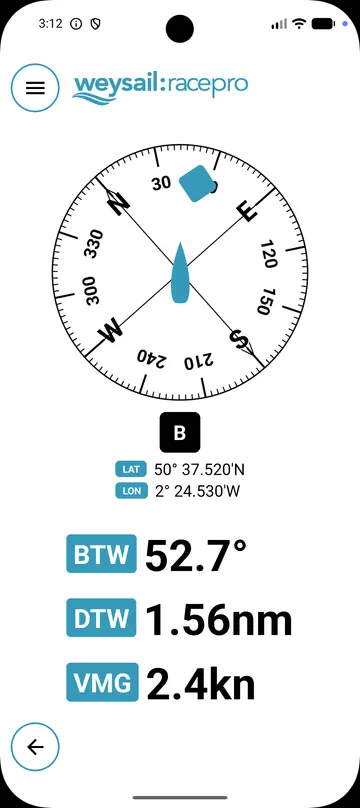
- Tap a mark and get bearing and distance in big, readable type.
- Learn it in five minutes on the dock.
- No account needed. Your marks stay on your phone.
 iPhone version coming soon
Free to download. Optional :racepro upgrade is €10 a year, in-app.
How it works
Five things to learn. That's it.
Free, or upgrade to :racepro
Everything you need to get round the course is free. :racepro adds the extras for keen racers.
| Feature | :raceFree | :racepro€10 a year |
|---|---|---|
| Store over 1000 marks | Included | Included |
| Themes, including night mode | Included | Included |
| DM or DMS coordinate format | Included | Included |
| Race start countdown timer | Included | Included |
| Velocity Made Good (VMG) | Not included | Included |
| External GPS via TCP/IP | Not included | Included |
| Import marks from GPX, KML, CSV | Not included | Included |
| Share marks as GPX, KML, CSV | Not included | Included |
Subscribe from inside the app. Cancel any time in Google Play.
Common questions
Is there a night mode?
Yes. In Settings → Display, choose one of three themes:
- Red on Black is night mode. Red text on a black screen protects your night vision after dark.
- Black on White gives the most contrast in bright sunshine.
- Yellow on Black stands out in grey or changeable light.
All three are free. You can also tick Prevent screen sleep to keep the screen on while weysail is open.
Can I change the latitude and longitude format?
Yes. In Settings → Position format, choose DM (degrees and decimal minutes, such as 50° 36.410′N) or DMS (degrees, minutes and seconds, such as 50° 36′ 24.6″N). weysail uses your choice everywhere it shows or edits a position.
What if my device doesn't have GPS built in?
weysail needs an accurate position to work out bearing and distance to a mark. Location from Wi-Fi or mobile networks alone isn't accurate enough near a mark, and usually isn't available on the water.
With :racepro, you can use your boat's GPS instead. In Settings → Position Source, choose TCP/IP and enter the hostname or IP address and port of the NMEA 0183 source on your boat's network, such as a chartplotter or Wi-Fi NMEA multiplexer. weysail reads position from RMC and GGA sentences, and heading from HDG and VHW.
What countdown sequences are supported?
Two: 5, 4, 1 and 3, 2, 1 minutes. Choose one in Settings → Countdown Sequence, then tap the timer button at the top right of any screen. Tap the button for the signal you're at, such as 5 at the warning signal, to start counting down from that minute.
Tap Sync to round to the nearest whole minute if you started a few seconds late. weysail beeps and vibrates on each minute and for the last 10 seconds, then counts up your race time after the start. The countdown timer is free.